Sponsor Ads


Close this ad

Showing posts with label Disable. Show all posts

Disable XP Boot Logo

It is possible to disable the XP splash screen, which will slightly speed up the overall boot process. Be aware that removing the splash screen will also cause you not to see any boot-up messages that might come up(chkdsk, convert ... ), but if your system runs without any problems then it should not matter.

· Edit boot.ini.
· Add " /noguiboot" right after "/fastdetect".

Upon restarting, the splash screen will be gone. It can be re-enabled by removing the new switch.

read more

Disable XP Boot Logo

It is possible to disable the XP splash screen, which will slightly speed up the overall boot process. Be aware that removing the splash screen will also cause you not to see any boot-up messages that might come up(chkdsk, convert ... ), but if your system runs without any problems then it should not matter.

· Edit boot.ini.
· Add " /noguiboot" right after "/fastdetect".

Upon restarting, the splash screen will be gone. It can be re-enabled by removing the new switch.

read more

Delete Safely Remove Hardware Icon

If you have an USB device attached to your system, you will notice an icon in the Notification area, which when clicked will give you the option to Stop your hardware, before you unplug it. And if usb device permanently attached to your system and you never unplug this hardware. So now you can get rid of that icon. just follow these steps:

1). Right-click the notification area, and selecting Properties.
2). Under the Notification area heading, click Customize.

read more

Enable Right click on Websites which had disabled it

Lots of web sites have disabled the right click function of the mouse button...which disables all functionalities like: Copy, Paste, Open in new tab, Open in new Window etc.. It's really very annoying. But you need not to worry, now you can enable right click on those websites, It's very easy to change this setting in Internet Explorer, Just follow these steps:

read more

Activate and Deactivate SCREENSAVER - Cool Computer Tricks

You can activate or deactivate screensaver whenever you want. You have to make some changes in windows registry after then you can activate your screensaver by simply placing the mouse cursor at the top right corner of the screen and if you take the mouse to the bottom left corner of the screen, the screensaver will deactivate.
Follow these steps:

1) Go to RUN.
2) Type regedit and press Enter.
3) Then in Registry Editor window go toHKEY_CURRENT_USER\Software\Microsoft\Windows\

read more

Disable or Enable Right Click on Taskbar - Cool Computer Tricks

Here is trick to remove right click functionality from taskbar. You just have to do some editing in windows registry editor. It willl disable right click on all components of taskbar. Just follow given steps:


1). Go to Start -> Run -> regedit.

read more

Show OR Hide profile visits in Orkut - Cool Computer Tricks

Do you want to visit profile of other users anonymously, dont want to show yourself in their recent visitors?? If yes then this trick is for you. Now you can prevent other users from knowing you have looked at their profile. Bur choosing this setting will prevent you from seeing who has viewed your own profile, You cant see your own profile's recent visitors.
To show or hide profile visits, just follow these steps:

read more

Forcefully eject Pendrive - Cool Computer Tricks

Sometimes, while ejecting USB flash drives or pendrives from system, an error comes saying The device Generic Volume cannot be stopped right now, Try stopping the device again later.
Here is a free utility called EjectUSB that forcefully stops all the running programs and helps in ejecting pen drives safely.
It is designed to be a simple utility to close all programs running from a specified drive or folder and then attempt ejection if a drive was specified.

read more

Turn On/Off numlock on StartUp

Mostly keyboards have small numeric keypad which can also be used for some other functions like page up, page down. It also has 1 key known as numlock key when it is on, keypad used for numbers and when numlock is off, keypad used for other functions.
Windows turn off numlock key by default, so if you want to turn on numlock key by default on start up then now you can do it very easily. You have to do only some changes in registry. Just follow these steps:

read more

Split text among Clumns in MS Excel - Useful Computer Trick


Suppose you have some data in word file or notepad about some person like first name, last name, age etc... Now you have to sort this data according to last name. This problem is very easy and can be solved easily by using MS Excel but what happens is when you copy paste whole content in Ms Excel file it will first and last name and age in the same cell.

read more

Enable or Disable Control Panel

If your friends, childrens or family members use your computer and you do not want them to change any system setting then best way for this is to disable Control Panel. To disable control panel you have to do some changes in Regisstry. Just follow these steps:

read more

Disable useless repeating error notifications

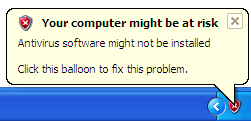
Your computer may be at risk. Your virus protection status is unknown and many others.These are some notifications which windows gives to maintain computer security.

read more

Turn off all system Beeps - Cool Computer Tricks

wanna turn off all cpmputer beeps?? just follow these steps you need to do some changes in registry but its very simple. Follow these steps:
1). Open Run.

read more

Disable the Blinking Cursor in Computer Applications

If you are using any computer application, for example MS Word or MS FrontPage and you did not like blinking of cursor. Now you can stop the cursor from blinking in these applications, for this you have to edit your computer registry keys, but be careful to work with computer registry. Its very simple just follow the given steps to stop cursor from blinking:


1). Click on Start button then type Regedit in Run option.

read more

Filter Web Surfing - Remove Ads, scripts and animation from websites

Most of websites displays lots of advertisement banners, pop up ads, animation etc. If you don't like these ads n all then you can remove all these undesirable things.

read more

Hide recently opened files and programs from Start Menu

Windows save list of recently opened files and show them in start menu. Its very convinient to find files. But if you wanna some privacy, if you don;t want others to see which files and programs you opened than you can hide recent files.

read more

Disable display of Drives in My Computer

You can disable display of local and networked drives when you click My Computer. Try this trick on your friend's computer and see their reactions when they saw their is no drives. To disable dispaly of drives you have to make some changes in windows registry just follow these steps:
1) Go to RUN.
2) Type regedit and press Enter.
3)Then in Registry Editor window go to
HKEY_CURRENT_USER\Software\Microsoft\Windows\CurrentVersion\Policies\Explorer.

read more

Hide all Items from desktop - Cool Computer Tricks

Do you want to fascinate your friends?? Here is one cool trick by using this you can hide all Items from desktop including all files , folders and even system folders..
To hide all items just follow these steps:

read more