Sponsor Ads


Close this ad

Showing posts with label Display. Show all posts

Customize the Start menu

The Start menu gets more real estate in XP than in previous versions, and it's more customizable. To make the Start menu display only the applications you want, rather than the default determined by Microsoft,follow these steps..

1) right-click in an empty section of the Start menu's left column.

2) select Properties > Start Menu > Customize.

read more

Keep Your Favorite Programs Near the Top of the Start Menu

Do you have a favorite program that you frequently use? Elevate its priority on the Start menu by putting it at the top of the list. This ensures that the program will remain on the Start menu and cannot be bumped by other programs, even if you use the others more frequently.

Right-click the link to your favorite program on the Start menu and select Pin to Start Menu. Your program will be moved permanently to the top part of the list, just below your browser and e-mail programs.

read more

Rename the Recycle Bin

Want to do something different? change name of recycle bin desktop icon it would amazed your friends. To do this follow these steps..

To edit the computer registry, first you should log onto your computer with administrative rights.

To change the name of the Recycle Bin desktop icon, open Regedit and go to:

read more

Make your Desktop Icons Transparent

Change the look of desktop of your system by making your Desktop Icons transparent.To do this follow these steps..

Go to control Panel > > System, >> Advanced >>Performance area >> Settings button Visual Effects tab "Use drop shadows for icon labels on the Desktop"

read more

Add picture to Folder

You can add a picture on a folder. Just follow these steps..

1) Right click on folder you want to add picture and click properties.
2) In dialog box click customize tab then click choose pictures.
3) Choose picture which you want on folder.
4) click ok

read more

Instantly Activate a Screensaver

Turn on a screensaver without having to wait by adding a shortcut to your desktop:


1). Click the Start button and then click Search.

2). In the Search Companion window, click All file types.

3). In the file name box, type *.scr

read more

Disable XP Boot Logo

It is possible to disable the XP splash screen, which will slightly speed up the overall boot process. Be aware that removing the splash screen will also cause you not to see any boot-up messages that might come up(chkdsk, convert ... ), but if your system runs without any problems then it should not matter.

· Edit boot.ini.
· Add " /noguiboot" right after "/fastdetect".

Upon restarting, the splash screen will be gone. It can be re-enabled by removing the new switch.

read more

Do Not Highlight Newly Installed Programs

Tired of that annoying little window that pops up to tell you that new software is installed? If it gets in the way when you're logging off, turn it off completely. To do this:

· Click Start, right-click at the top of the Start menu where your name is displayed, and then click Properties.

read more

Change the Start Menu Style

Does the new Windows XP Start menu take up too much space on your desktop? You can easily change the look back to the Windows Classic Start menu by following these steps:

· Right-click the Start button, and then click Properties.

· Click Classic Start menu.

read more

Customize ur IE's titlebar

-Click Start > Run > Type gpedit.msc
-Click User Configuration > Windows Setting > Internet Explorer Maintenance > Browser User Interface
-Double click on Browser Title Click on Customize Title Bars.
-Change the text to what whatever you want Click then click Ok

read more

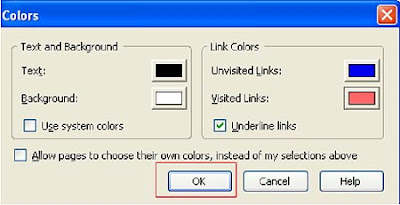
Change links colour in firefox


Do you want to chnage the link color on firefox, dosnt lyk blue color or want to chnge the color of visited links from purple to any of your choice. then here is solution you can change these links color in minute.

read more

Show run in start menu in vista

Windows Vista has a new search bar located on the Start Panel. You can use the new search box to find items in the various folders of your Start Menu as well as run any application from it. Just type in the name of the executable and it will search your hard drive for it and run it. This is a great feature but if you have a lot of files on your computer, then be prepared for a short delay since it may have to search for a while.

read more

Remove underline from links in mozillla

By default, links are underlined on Web pages in Firefox. If you do not want them underlined then just follow these steps

read more

Display wheather forecasts on status bar of mozilla firefox

If you have habit to go through weather reports of your city daily then you need not to browse websites for it. Now you have better option, you can get instant whether information and forecasts on status bar of Mozilla firefox.
The Forecastfox extension does just that, displaying weather information from AccuWeather. To install follow these steps:

read more

Use onscreen Keyword

If you Want to use on screen keyboard then follow these steps :

1). Click on the start button.
2). Select run.
3). Then type "osk" in the box.
4). Click OK.

read more

Improve font display in window xp

Now you can improve font display in window XP. Window xp has ClearType, a Microsoft's anti-aliasing font display technology that can dramatically improves font display. but it isnt enabled by default in xp you have to enable it.

To enable ClearType:

read more

Set Windows Logon Wallpaper

Logon wallpaper is the wallpaper or image that windows shows on screen when windows logs on (before it asks for username & password) . It’s usually set to the image-logo of the brand of our computer (e.g. in compaq laptops). If you are get tired of watching that wallpaper then now this is right trick for you jaust follow these steps and set it to our own image or any other image(any bmp file)


read more

Make Folder Invisible - Cool Computer Tricks

Do you have some confidental files want to hide them with other users then this trick is for you. by using this trick you can hide a folder without using any software just follow these steps:

1) Right Click on the desktop(or where you want to create invisible folder) and make a new folder.

read more

Add your PICTURE to My Computer Properties - Cool Computer Tricks

Now you can add your picture or any other picture in my computer properties. To do this follow given steps:


1). Open Notepad.

read more

Insert ur NAME in the bottom right Taskbar - Coo computer Trick

Do you know that you can insert your name in bottom right corner of taskbar. just follow the instructions below and amaze your friends and relatives. Here are steps:

read more